Blow mention the difference of between DELETE and TRUNCATE in MS-SQL Server.
1) Command Type
DELETE - DML(Data Manipulation Language )Command.
TRUNCATE - DDL (Data Definition Language)Command.
2) Role Back
DELETE - Can Role Back using Transactions.
TRUNCATE - Can not Role Back.
3) Identity Reset
DELETE - Identity Column didn't Reset.
TRUNCATE - Identity Column Reset.
4) Lock
DELETE - Row lock ,each row is locked to Delete.
TRUNCATE - Table lock ,whole table is locked to remove all records.
5) Where Condition
DELETE - Support for Where Condition.
TRUNCATE - Didn't Support for Where Condition.
Tuesday, 29 August 2017
Sunday, 11 June 2017
What is the difference between an abstract method and a virtual method?
Abstract Method
- Abstract method is defined in only
abstract class.
- Abstract method should contain
only method definition (No Implementation).
- Abstract method must be override
in the derived class.
Virtual Method
- Virtual
methods may or may not override in the derived class (not mandatory).
- Virtual
methods must have implementation along with definition of method.
follow mention the
implementation
public abstract class BaseClass{
public abstract decimal GetSumAbstractMethod(decimal value1, decimal value2);
public virtual decimal GetSumVirtualMethod1(decimal value1, decimal value2)
{
return value1 + value2;
}
public virtual decimal GetSumVirtualMethod2(decimal value1, decimal value2)
{
return value1 + value2;
}
}
public class DerivedClass : BaseClass{
public override decimal GetSumAbstractMethod(decimal value1, decimal value2)
{
return value1 + value2;
}
public override decimal GetSumVirtualMethod2(decimal value1, decimal value2)
{
return (value1 + value2) *2 ;
}
public void ImplementationMethods()
{
DerivedClass derivedClass = new DerivedClass();
derivedClass.GetSumAbstractMethod(1, 2);
derivedClass.GetSumVirtualMethod1(1, 2);
derivedClass.GetSumVirtualMethod2(1, 2);
}
}
Thursday, 24 March 2016
How to Allow Non-Admin To Start And Stop System Services
Step 1 – Create the Console
Ø
Click Start > Run (or
press WIN + R) and type “mmc.exe”
Ø
This opens an empty
Microsoft Management Console. Click File > Add/Remove Snap-in… (Ctrl+ M)
Ø
Click Add
Ø
Next select Security Templates
Ø
Click Add
Ø
Click OK
Step 2 – Create a blank Security
Template
Ø
Right-click Security Templates from the console tree and select New Template Search Path.
Ø Browse to C:\temp, or other local path, and click OK
Ø Right-click C:\temp from
the console tree and select New Template
E.g. Windows Services. It doesn’t matter what you use.
Ø The Description is
optional but may be useful if you want to re-use it
Ø Click OK and you will see the new template appear in the
console
Step 3 – Create a Security Database
Ø Right-click Security
Configuration and Analysis from the console tree and select Open Database
Ø Browse to C:\temp, or other local path, and type a name in the box
E.g. Security
Ø Click OK. This creates an Security.sdb file that is used to apply the changes
Ø An Import Template window
appears.
Browse
to C:\temp\
Windows Services.inf and
select Open. This applies the template with all the local
services to the database
Ø If you get the error “The database you are
attempting to open does not exist.” then you need to choose a different path
i.e. on a local disk
Ø Click OK to accept the default log file path
Ø You
will then be presented with something that looks very similar to the Group
Policy Editor or Local Security Policy Console.
Step 4 Change Service Permissions
Ø Double-Click System Services
Ø Scroll
down to find these 3 services which you need to change Service
Ø Double-Click
the service
Ø Tick
the box Define
this policy in the database
Ø Click
the Edit
Security button
Ø
Select or add user And Allow Full Control.
Ø Click
OK on the Service Properties to bring you back to the console
Ø You’ll
notice the Service now has an ‘x’ on it and Investigate message
on the Permission column. This is because the new
permissions we’ve chosen conflict with what is on the local computer.
Step 5 – Apply new Security
Permissions
Ø Right-click Security
Configuration and Analysis from the
console tree and select Configure Computer.
Ø Click OK to accept the default
log file path.
Ø This
will apply the new custom permissions to the local computer
Ø You
can now test it out on the server with the account and test it works.
Sunday, 6 March 2016
How to force .NET Application to run as administrator on Windows
If we want application force to run as Administrator on windows, how we can do that
following i have describe how we can do this for .Net application.
1. First we need to add a new Application Manifest file your .Net project.In the Project, Right click on the solution and click “Add new Item” and then add Manifest file
2. Then need to change In Manifest File, modify the <requestedExecutionLevel> to <requestedExecutionLevel level=”requireAdministrator” uiAccess=”false” />
Now user starts the application, user will prompted with the UAC and on accepting the program will run the admini mode.
following i have describe how we can do this for .Net application.
1. First we need to add a new Application Manifest file your .Net project.In the Project, Right click on the solution and click “Add new Item” and then add Manifest file
2. Then need to change In Manifest File, modify the <requestedExecutionLevel> to <requestedExecutionLevel level=”requireAdministrator” uiAccess=”false” />
Now user starts the application, user will prompted with the UAC and on accepting the program will run the admini mode.
Dependency Injection in C# with Example
Dependency Injection (DI) is a design pattern that take away from the responsibility by creating a dependency class to create loosely coupled system.Most people not clear idea about what is dependency injection (DI) and when it want to use in the code.
In this article i'm taring to describe what is dependency Injection(DI) and how we use to get loosely coupled system using simple example.Imagine you have face situation like follow
you have class Employee and it has Logger for print message.and also you have to add another Logger method for different customer,normally we can implement that as follow.
public class Employee { private LoggerOne LoggerOne;
private LoggerTwo LoggerTwo; }
public class LoggerOne { public void WriteToLog(string text) { Console.WriteLine(text); } }
public class LoggerTwo { public void WriteToLog(string text) { Console.WriteLine("***********\n {0}\n***********",text);} }
but in this implementation Employee class tightly coupled with LoggerOne and LoggerTwo.So this system hard to modify and reuse.
So prevent that issue we can use dependency Injection to solve this and get loosely coupled system.
We can use interface ILogger class for the Logger to inject the dependency to Employee class as follow
public class Employee { private ReadOnly ILogger _logger;
public Employee(ILogger Logger){
_logger=Logger;
_logger.WriteToLog("Test Logger");
}
}
public interface ILogger { void WriteToLog(string text); }
Now let's instantiate an Employee with two different loggers:public class LoggerOne : ILogger { public void WriteToLog(string text) { Console.WriteLine(text); } } public class LoggerTwo : ILogger { public void WriteToLog(string text) { Console.WriteLine("***********\n {0}\n***********", text); } }
Employee employee1 = new Employee(new LoggerOne());
Employee employee2 = new Employee(new LoggerTwo());
And the output:
Test Logger
*******************
Test Logger
******************
Monday, 22 February 2016
LINQ Operator in C#
LINQ stands for Language Integrated Query and is Microsoft’s advanced data access technology that is used to query collections of data.
The collections can be of two types:
1. local collections such as collections belonging to the System.Collections namespace and the System.Collections.Generic spaces
e.g. List<T>,Dictionary, HashSet etc
2. Other collections are remote collections such as an XML document or a database table
Syntax of LINQ
There are two syntaxes of
LINQ. These are the following ones.
·
Lamda
(Method) Syntax
Example
var longNames = Names.Where( n => n.length > 10);
·
Query
(Comprehension) Syntax
Example
var longNames = from n in Names where n.length > 10;
var longNames = Names.Where( n => n.length > 10);
var longNames = from n in Names where n.length > 10;
Monday, 1 February 2016
How to return NULL value from generic method in C#
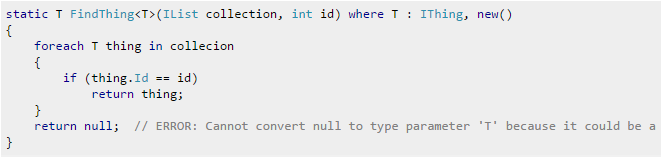
Following my Example code for describe the issue,
following i have written the generic method to Search thru the list by using given search value
if value in list return the list and otherwise return NULL Value.
According to the code it seems ok.but it get following error
Cannot convert null to type parameter 'T' because it could be a value type
For avoid that issue following option
1- Method
Return default(T) which means you'll return null if T is a reference type (or a nullable value type), 0 for int, '\0' for char etc
2- Method
Restrict T to be a reference type with the where T : class constraint and then return null as normal
following i have written the generic method to Search thru the list by using given search value
if value in list return the list and otherwise return NULL Value.
According to the code it seems ok.but it get following error
Cannot convert null to type parameter 'T' because it could be a value type
For avoid that issue following option
1- Method
Return default(T) which means you'll return null if T is a reference type (or a nullable value type), 0 for int, '\0' for char etc
2- Method
Restrict T to be a reference type with the where T : class constraint and then return null as normal
Subscribe to:
Posts (Atom)
-
SQL language is divided into four types of primary language statements . Follows mention regarding the four main categories of SQL stat...
-
If we want application force to run as Administrator on windows, how we can do that following i have describe how we can do this for .Net ...
-
According to SRP a class should take one responsibility and there should be one reason to change that class. When a class has more than on...